
InventoryInventory managementInventory Management System
Hospital inventory software that keeps every store stocked
Batch and expiry followed from delivery to the ward.
One system
Every item, from delivery to bedside
Stores, departments and purchasing share one stock record, so what's on the shelf matches what's in the system.
Stores and purchasing
The whole supply chain on one screen
Requests, orders, deliveries, stock value and spend, updated as the work happens.
See the modulesExpiry
Nothing expires on the shelf
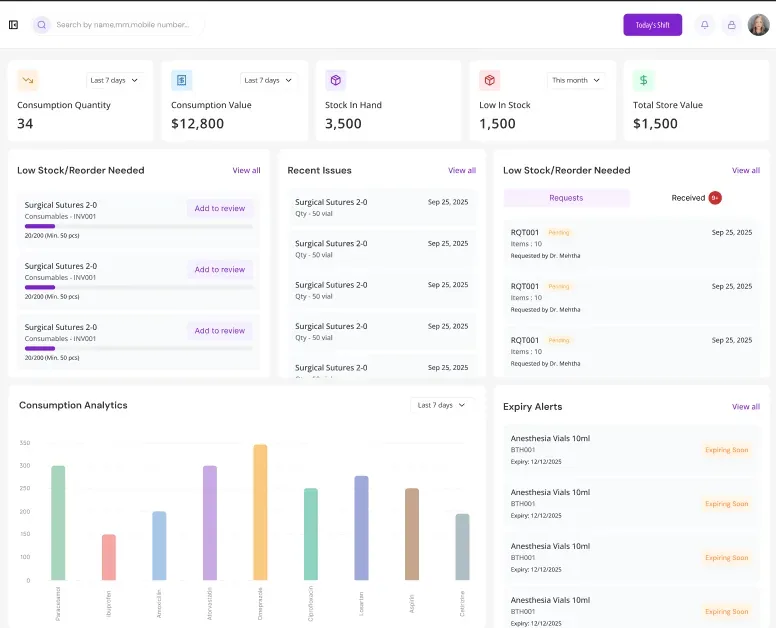
Every batch has its expiry date, and items close to it are flagged in time to use, move or return them.
See the modulesReorders
Low stock raises its own request
Each store has minimum levels, and falling below one starts a purchase request.
See the modulesDepartment issues
Every issue recorded
Items issued to wards and theatres are logged by department and date.
See the modulesPurchasing
Orders you can plan ahead
Quantities ordered by month and category, with suppliers and contracts alongside.
See the modulesConsumption
Know what each department uses
Consumption by item and store, so budgets and orders are based on real use.
Works with Finance
Works with the rest of MedAura, on the same record
- HMIS· The whole hospital on one patient record
- CMS· Appointments, consultations and billing for clinics
- LMIS· Orders, samples and results in one flow
- RIS· Imaging orders, worklists and reports
- NMS· Rosters, care notes and shift handovers
- OTMS· Theatre scheduling and surgical records
- Referral· Referrals tracked from request to return
- IVF· Fertility cycles and treatment tracking
- M-Scribe· Notes, prescriptions and orders, written as you talk
- AVA· Greets, checks in and guides every patient
- Pharmacy· Dispensing, stock and controlled drugs
- AMS· Equipment, maintenance and asset lifecycle
- HRMS· Shifts, attendance and payroll for hospital staff
- Finance· Accounting built for healthcare
- RCM· Claims, billing and collections
How it works
One delivery, from request to theatre
Follow a box of surgical sutures through the supply chain and see how each step updates the next.
- 1Requested
The store asks on its own
The theatre store drops below its minimum level, and a purchase request is raised without anyone filling in a form.
MedAura · Purchase requestsSample dataPurchase request · PR-1042
ItemSurgical sutures 2-0StoreOperation theatre sub-storeReasonBelow reorder level · 20 of 50RaisedAutomatically · 07:40 - 2Ordered
Approved and ordered
Procurement approves the request and sends the order to the supplier, at the agreed price.
MedAura · Purchase ordersSample dataPurchase order · PO-3321
SupplierMedSupplierQuantity500 packsApproved byProcurement manager · 09:12StatusSent to supplier - 3Received
Checked in at the door
The delivery is checked against the order, and its batch and expiry date are captured as it's scanned in.
MedAura · Goods receiptSample dataGoods received · GRN-2210
Received500 packs of 500 orderedBatchSUT-8841ExpiryMarch 2028Check Matches the orderScanned into the central store
- 4Stored
Visible to everyone
Stock, spend and expiry alerts update straight away, for the store and for procurement.
MedAura · Central storeSample data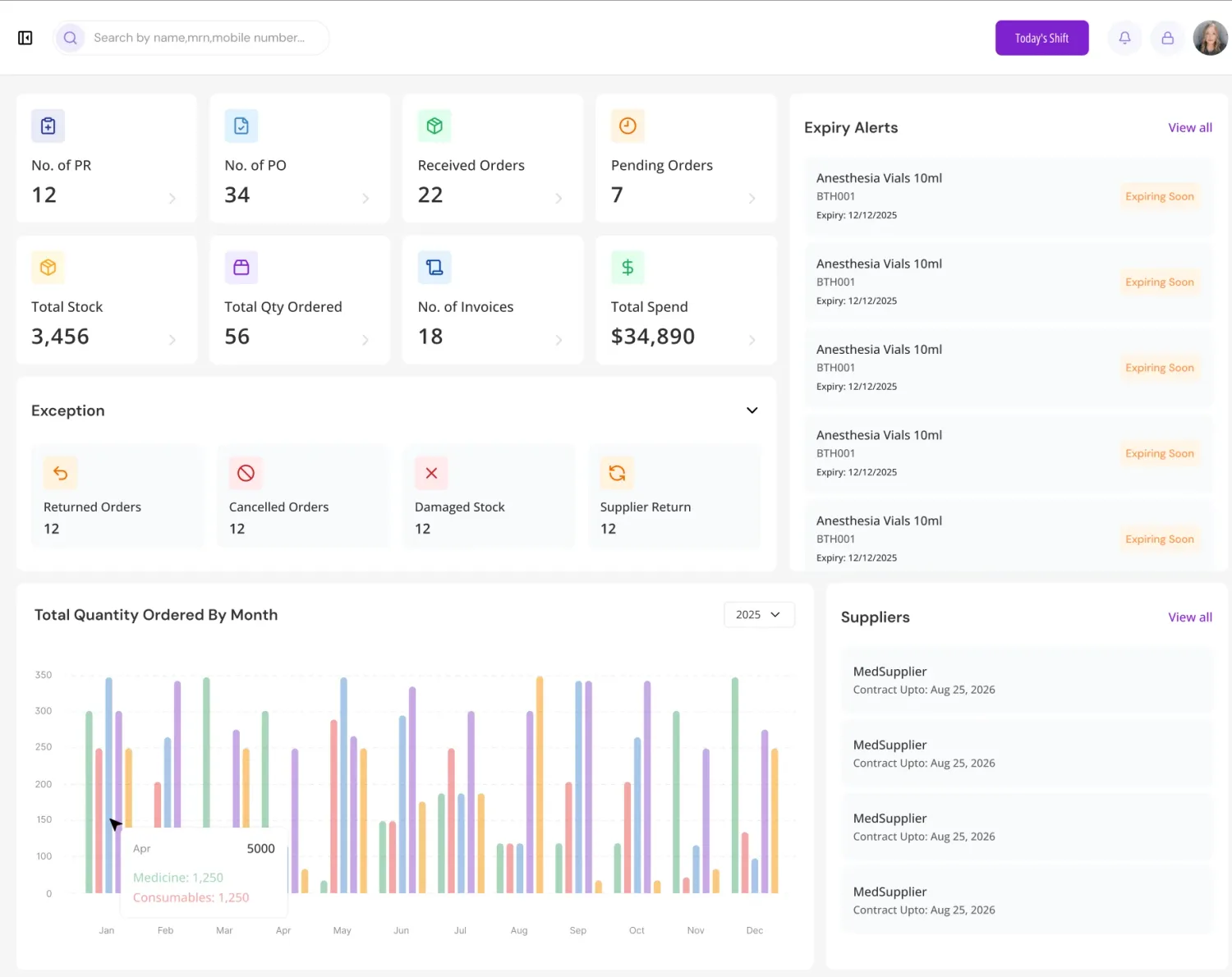
- 5Used
Issued and charged
Packs are issued to the theatre, and each one used in surgery is added to the patient's bill.
MedAura · Department issuesSample dataIssued to
Theatre 2
Quantity
50 packs
Left in store
450
Used today in Theatre 2
Laparoscopic cholecystectomy4 packs · charged to the patientAppendicectomy2 packs · charged to the patient
Purchase request · PR-1042

Built for hospital stores
Stock you can count on
From the central store to every department, each item is traceable to where it came from and where it went.
- stock record across the central store, pharmacy and departments
- 1
- stock record across the central store, pharmacy and departments
- valuation methods: first-in first-out and weighted average
- 2
- valuation methods: first-in first-out and weighted average
- steps to restock: request, order and receipt
- 3
- steps to restock: request, order and receipt
- support, because stores never close
- 24/7
- support, because stores never close
- Encrypted in transit and at rest
- Every action on a record is logged
- Role-based access for every screen
- Built to support HIPAA and GDPR
Everything included
Everything the stores run on
From the central store to every ward and theatre, with purchasing built in.
20 modules in 4 groups
Central and sub-stores
The central store, pharmacy and department stores in one system.
Batch and lot tracking
Every item traced by batch or lot, from receipt to use.
Expiry alerts
Items flagged well before they go out of date.
Reorder levels
Minimum levels for each store, with automatic requests when stock runs low.
Stock counts
Physical counts reconciled against the system.
Valuation
Stock valued by first-in first-out or weighted average.
Getting started
From first call to go‑live
About eight weeks is typical for a mid-sized hospital. Fewer departments can be quicker; more departments, analysers or sites take longer. Either way your plan is written down, with dates and owners, before anything changes.
- Weeks 1–2
Discovery
We map your departments and current systems, and agree a written plan.
- Weeks 2–4
Configuration
Roles, workflows, billing rules and forms set up the way you work.
- Weeks 3–5
Data migration
Records and balances moved across and checked against the source.
- Weeks 5–7
Training
Role-based sessions for every team, on your own configured system.
- Weeks 7–8
Go-live
Departments go live in phases, with our team on hand afterwards.
Typical timings for a mid-sized hospital. Yours are agreed with you before anything starts.
Questions
MedAura Inventory, answered
Something else on your mind? Email info@medaura.io and a person will reply.
What does MedAura Inventory cover?
Medicines, consumables and supplies across the central store, the pharmacy and every department store, with purchasing from request to delivery.
Does it track batches and expiry dates?
Yes. Every item is tracked by batch or lot with its expiry date, and items approaching expiry are flagged in advance.
Can it prevent stock-outs?
Each store has its own minimum levels. When stock falls below them, a purchase request is raised automatically.
How is stock valued?
Stock can be valued on a first-in first-out basis or by weighted average, and valuation reports are available for finance.
Can we see what each department uses?
Yes. Every issue and return is recorded by department, so consumption can be reported by item, department and period.
Does it handle transfers between stores?
Yes. A transfer updates stock in both the sending and receiving store.
How does purchasing connect to stock?
Requests, orders and goods receipts all feed the same stock records, so deliveries appear in the store as soon as they're received.
Is every change recorded?
Yes. Every stock movement is logged with the user and the time, ready for audits.
Ready to see your stores on MedAura?
Tell us about your stores, your suppliers and how you order today. We'll set up a demo around your supply chain.
A reply within 24 hours
A person from our team, not an automated sequence. Support is available 24/7 once you're live.
A plan in writing
Departments, data, training and dates agreed with you before anything changes.